App surfaces
The admin dashboard widget: PROJECT/PLATFORM sidebar, panels, and deep-link state.
The Admin widget is a singleton workspace widget opened from the Shield icon
on the bottom dock rail. It renders frameless and transparent over the
workspace background, and its visibility requires the project.dashboard
feature — granted to every role by default, so all members can at least see
the system overview.
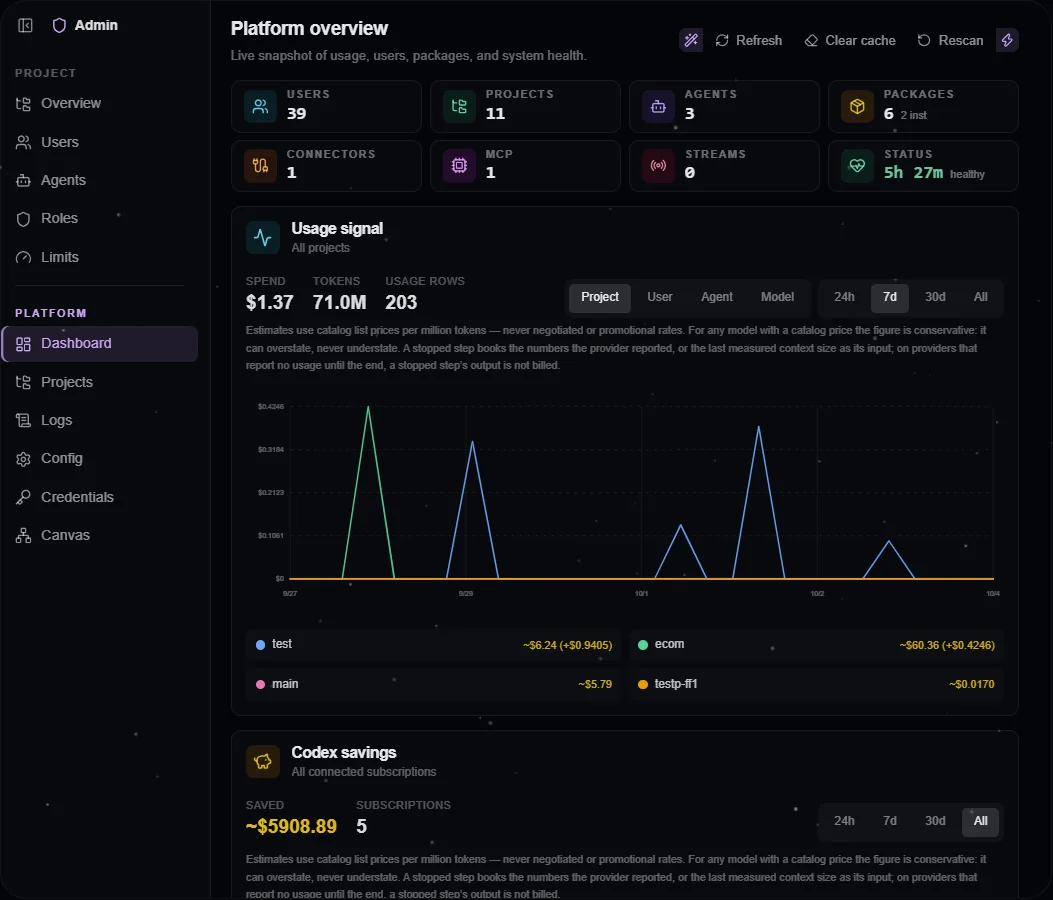
The platform Dashboard in a configured installation. Project administration is available through the same sidebar.
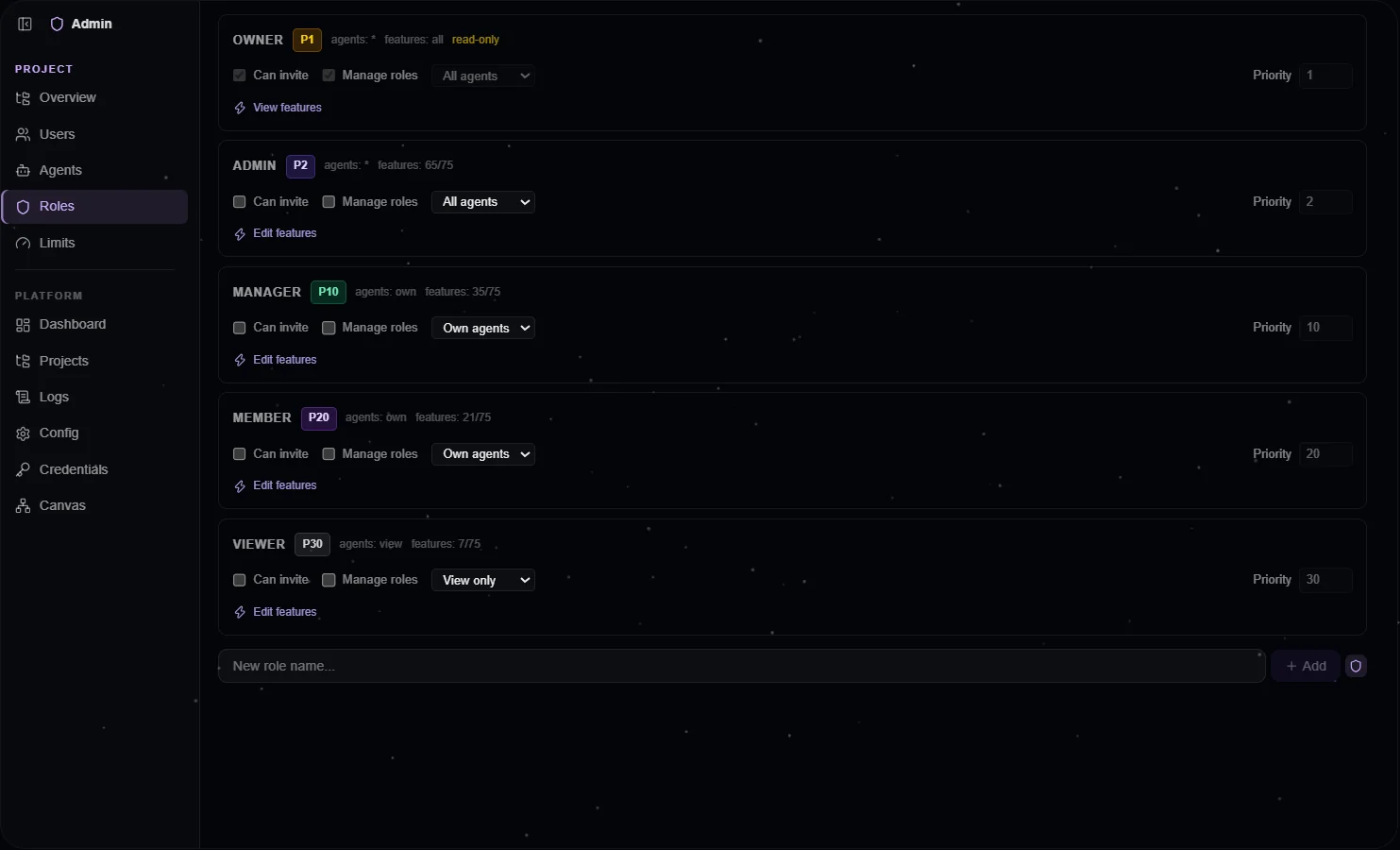
The Roles editor exposes feature grants and role priority; server-side rules govern changes.
Sidebar: two scopes
The widget is a vertical sidebar shell split into two scopes:
- PROJECT — operates on the currently active project. Tabs: project overview, users, agents, roles, limits.
- PLATFORM — cross-project, system-wide. Tabs: dashboard, projects, logs, config, credentials, canvas.
Selecting a tab in either scope switches the active scope automatically, so moving between project and platform administration takes one click. A single collapse button controls the sidebar; on narrow widths it floats inside the content area.
Tab visibility follows the caller's granted features:
| Tab | Scope | Visible when |
|---|---|---|
| Project overview | PROJECT | Always |
| Users | PROJECT | project.members |
| Agents | PROJECT | Always (read-only unless the role carries the role-management flag) |
| Roles | PROJECT | project.roles |
| Limits | PROJECT | Always (read-only unless the role carries the role-management flag) |
| Dashboard | PLATFORM | Always |
| Projects | PLATFORM | platform.projects |
| Logs | PLATFORM | project.audit |
| Config | PLATFORM | project.roles (its weakest section) |
| Credentials | PLATFORM | project.credentials |
| Canvas | PLATFORM | project.canvas |
The Config tab gates per SECTION with the same rule: Platform Settings needs
platform.config, Vector needs platform.vector, Roles & Features needs
project.roles, Source Configs needs project.sources. A section the caller
cannot use is hidden, never shown disabled.
The project record itself is served through the same feature lens. A bare
membership reads the project without other members' email addresses
(project.members), without other roles' feature grant lists
(project.roles), and without other members' per-user spend caps
(project.limits) — each slice appears only for holders of its feature. Your
own member row, your own role's grants and your own spend cap are always
visible, and a role that can manage members and roles reads the full record.
The affected tabs degrade accordingly: role cards without a visible grant
list hide the feature editor, and the Limits tab lists only the per-user rows
the caller may see.
The Users tab lists the members of the active project (every user with
platform.users). Disable, enable, reset password and delete act on the
platform-wide account, so each row shows them only when the server says you
govern that user in every project they belong to — the tab never guesses.
Delete opens a preflight first: the projects that would refuse it and the
personal credentials that go with the account. The Projects tab adds an
existing user to a project by their exact email address.
Platform Settings lists a few hundred keys, so it carries a filter that narrows them to a single declarer — one package, the host's own keys, or the read-only environment rows — with the number of settings each one owns. The list of declarers is derived from the settings on screen rather than fixed in code, so a package the operator added themselves appears without any change to the dashboard.
Agents and Limits both save through the host's privileged project patch, whose
gate is the role's canManageRoles flag rather than a feature — so their
read-only state mirrors that flag. The Agents tab can also delete an agent:
each row's trash icon opens an inline confirm naming the agent and warning that
its conversations, memory and identity are removed with it, then calls the admin
package's DELETE /agents-admin/:id route (gated by the same core.agents
feature as agent-core's own agent routes), which delegates to agent-core's
agent service — agent access is re-checked server-side there, independently of
the flag that shows the button. This route audits the deletion itself rather
than going through agent-core's own DELETE route, which audits its own; the
two paths are separate, so a deletion is recorded exactly once whichever
surface it came from. The project's ownership entry for that agent is dropped by
the platform as part of the delete, on every path — the tab does not write it
back itself, and it refetches the project before the row disappears.
If a previously-selected tab (or Config section) becomes hidden because a feature grant was removed, the widget falls back to the first visible one. Client-side hiding only mirrors the server-side gates described in Features and routes.
Dashboard
The platform Dashboard is stats-first and fully visible at once — no inner scrolling, no collapsed heroes:
- A dense KPI chip strip with eight metrics: Users, Projects, Agents, Packages, Connectors, MCP, Streams, and Status with uptime. The grid reflows from two to four to eight columns with available width.
- A usage chart card (see below).
- A two-column grid of compact section cards: system health (status headline plus per-check rows), loaded packages, active streams (agent, user, and started-ago per stream), and configured LLM providers.
The project overview tab follows the same pattern at project scope: a KPI row (members, roles, agents), the project-scoped usage card, a compact project-info form, and an organization hierarchy tree that groups members by their role priority.
Usage charts
Both the Dashboard and the project overview embed the shared usage card: a range toggle (24h / 7d / 30d / All), a group-by toggle, a totals row, a multi-line SVG chart, and a per-series legend. Series arrive pre-bucketed from the server via the usage endpoint — the client never aggregates raw events.
Both cards print, above the chart, what the money means: the figures are estimates priced from the model catalog's list rates. The count metric reads Usage rows, not events — one row is one model's share of a turn, so a turn that delegated work to a subagent on another model contributes two.
Group-by options mirror the server's privilege gates: without platform.users
neither card offers the per-user dimension, and without platform.projects the
Dashboard card stays at project scope and offers no per-project dimension — so
non-privileged viewers never trigger a denied request.
Roles and priority editing
The project Roles tab renders one card per role with its feature grants and an ordinal priority value (lower = stronger). Built-in role priorities are immutable and shown read-only.
A card for a role at or above the viewer's own strength — their own role
included — renders read-only: its flags, agent tier, priority and feature
boxes are all inert, and the delete control is absent. That is a UI mirror of
the server rule (you may edit only roles strictly weaker than yourself); the
grants stay VISIBLE, only the controls are disabled, so the card still answers
"what does this role hold". For editable roles the priority input is clamped so
a caller cannot define one stronger than their own. All of it is best-effort
affordance — the server decision is authoritative, and the rules are described
in Roles and features.
Priority also appears on the member hierarchy tree, the member editor (derived from the role, read-only), the invite form (which only offers roles the caller may assign), and the platform Config and Projects tabs.
Feature checkboxes in the roles editor come from a runtime feature
catalog: the host aggregates providesFeatures from every loaded package
manifest, so no package's feature list is hardcoded in the admin UI. Each
feature shows its title and description plus a derived summary of the tools,
skills, commands, and widgets it gates.
Config, credentials, logs, canvas
-
Config — platform settings as a flat list: environment-derived entries (ports, URLs, infra mode) are read-only; file-backed runtime settings are editable. A row carrying an admin override (the
custombadge) also offers Reset, which removes the override so the value falls back to its backing environment variable when one exists (the badge flips toenv) or to the declared default. Sub-sections cover the role catalog, source configs (permissions, sync, and the one-line description agents see in their runtime-stack source table), and the vector store. The Vector section keeps two models apart: the active one, which every write and search embeds with, and the target you pick (model and dimension are saved as one change). Its credential row shows the ACTIVE model's key — missing means nothing embeds and semantic search falls back to full-text — with a second row for the target's key only when the two differ. When they differ, the section says how many points sit on the active model, gives a sample-based cost and time estimate on request, and waits: holders ofplatform.vector.maintainstart, resume or cancel the rebuild there and follow its progress and today's embedding spend. The Embedding endpoints card registers your own OpenAI-compatible/v1/embeddingsservers and their keys, and the destructive reset stays behind an explicit confirmation that names what it deletes,brain://content and its version history included. -
Credentials — the scope-aware credential catalog. Values are write-only: the UI shows only whether a value is set, never the secret. Each credential row also carries a use limit — a platform-wide cap of N calls per day, week or month, with live usage next to it. The unit is calls, not dollars, because external APIs do not report per-call cost; any credential in the catalog can carry a rule, matched by exact id. LLM provider keys are the exception: those are governed by the spend limits, and the row says so instead of offering a cap. The tab also hosts the OpenAI Codex OAuth connect flow. It acts on the SAME scope the picker at the top selects — there is no separate Codex scope choice. The one scope it will not connect for you is another member's: that login is their own ChatGPT session, so the connect and import actions are absent when the picker names someone else. It includes a manual callback-URL field for environments where the browser cannot reach the local loopback port, shown in both completion modes and highlighted when the deployment needs it. See Credentials. Every OAuth-signed credential — the Codex login and each MCP server you connected with OAuth — shows a status chip for the selected scope: valid (with the time left), expires in … once inside the warning window (24 hours by default, set by the Credential Expiry Warning config key), expired, refresh failed (the sign-in has to be redone) or expiry unknown when the issuer stated no lifetime. Hover shows the exact expiry and last refresh. The status is computed on the server and never includes a token.
Under the LLM Providers group it carries Custom endpoints — the editor for the platform's own OpenAI-compatible and Ollama-native LLM servers: your hardware, or a remote gateway with an API key. Each entry names its authentication and its address class, and a Test button asks the server whether the saved endpoint answers and with which models. The list is platform-global, so the whole section needs the platform-config feature and is hidden without it; the key slot additionally follows credential-write. See Providers and models for what each field does. The same editor, in its embedding form (each model with the dimension it returns and an optional price), is the Vector section's Embedding endpoints card; both lists are written through one admin route,
endpoints/llmorendpoints/embedding, which validates every entry and every public address before anything is saved and accepts the write only from a signed-in person, never from an agent's script. Removing, disabling or renaming an embedding endpoint whose model is active, targeted or being rebuilt into is refused (409 endpoint_in_use, nothing written); the reason is shown under that endpoint's row and the list keeps its state. -
Logs — audit events and per-source stream logs, filterable by level and source.
-
Canvas — an interactive graph (auto-laid-out) of users and agents with ownership and assignment edges. (A delegation edge type exists in the layout, but the graph endpoint returns no delegation data today, so none are drawn.) Clicking a node opens a detail panel; user nodes render the same avatar used across the workspace, while agent nodes and details use the same configured icon/color and fallback authority as Chat, Files, and the workspace agent dock.
Deep-link state
The widget honors initialTab and scope from its instance state, so other
surfaces can open it on a specific panel:
openWidget({
  agentId,
  type: 'admin',
  title: 'Admin',
  initialState: { initialTab: 'project-overview', scope: 'project' },
});
The project switcher's "Project settings" row is the admin package's own: the workspace offers the row as a slot, and admin fills it with exactly this call, so the admin widget opens on the project overview. Without the admin package there is no row.
Responsive behavior
The layout uses container queries: at 720px and above the sidebar shows full labels; between 480px and 720px it collapses to icons with hover tooltips; below 480px the sidebar hides entirely and a floating toggle reveals an overlay drawer.